It's possible to write code that wins every performance test in the world, but still sends users in a fiery rage when they try to use the application. These are the applications that aren't responsive enough the ones that feel sluggish, hang or freeze for significant periods, or take too long to process input.
세상의 모든 성능 테스트에서 승리하는 코드를 작성하는 것은 가능하다. 그러나 사용자가 애플리케이션을 사용하려 할 때 그것은 여전히 사용자를 거세게 화나게 하는 것도 가능하다. 이것들은 충분하게 응답하지 않는 애플리케이션들이다 ? 느리다고 느끼게 하거나, 상당한 기간 동안 동작하지 않거나 너무 시간이 오래걸려 입력을 처리하지 못하는 애플리케이션들이 그것이다.
In Android, the system guards against applications that are insufficiently responsive for a period of time by displaying a dialog to the user, called the Application Not Responding (ANR) dialog. The user can choose to let the application continue, but the user won't appreciate having to act on this dialog every time he or she uses your application. So it's important to design responsiveness into your application, so that the system never has cause to display an ANR to the user.
안드로이드에서, 시스템은 사용자에게 ANR(애플리케이션이 응답하지 않는다. Application Not Responding) 다이얼로그라고 불리는 하나의 다이얼로그를 사용자에게 보여줌으로써 일정한 시간동안 불충분하게 응답하는 애플리케이션을 감시한다. 사용자는 애플리케이션이 계속되도록 선택할 수는 있지만, 여러분의 애플리케이션을 사용할 때마다 이러한 다이얼로그에 대응해야 하는 것을 좋게 생각하지 않을 것이다. 그러므로 시스템이 사용자에게 결코 ANR을 표시하지 않도록 여러분의 애플리케이션에 응답성responsiveness을 디자인하는 것은 중요하다.
Generally, the system displays an ANR if an application cannot respond to user input. For example, if an application blocks on some I/O operation (frequently a network access), then the main application thread won't be able to process incoming user input events. After a time, the system concludes that the application has hung, and displays the ANR to give the user the option to kill it.
일반적으로 시스템은 애플리케이션이 사용자 입력에 응답할 수 없을 때 ANR을 보여준다. 예를 들어 만약 하나의 애플리케이션이 어떤 I/O 오퍼레이션(자주 네트워크 접속) 상에서 멈춘다면, 메인 애플리케이션 쓰레드는 들어오는 사용자 입력 이벤트를 처리할 수 없게될 것이다. 일정 시간이 흐른 뒤에, 시스템은 애플리케이션이 움직이지 않는 상태가 되었다고 결론내린다. 그리고 사용자에게 애플리케이션을 강제 종료시킬 수 있는 옵션을 주기 위해 ANR을 보여준다.
Similarly, if your application spends too much time building an elaborate in-memory structure, or perhaps computing the next move in a game, the system will conclude that your application has hung. It's always important to make sure these computations are efficient using the techniques above, but even the most efficient code still takes time to run.
유사하게, 여러분의 애플리케이션이 복잡한 메모리 내의 구조를 만들거나, 또는 게임에서 다음번 이동을 계산하는데 너무 많은 시간을 사용한다면, 시스템은 여러분의 애플리케이션이 움직이지 않는 상태라고 결론내릴 것이다. 위의 테크닉을 사용해서 이러한 계산을 효율적으로 만드는 것은 항상 중요하다. 그러나 가장 효율적인 코드조차도 실행하는 데 여전히 시간이 걸린다.
In both of these cases, the fix is usually to create a child thread, and do most of your work there. This keeps the main thread (which drives the user interface event loop) running, and prevents the system from concluding your code has frozen. Since such threading usually is accomplished at the class level, you can think of responsiveness as a class problem. (Compare this with basic performance, which was described above as a method-level concern.)
이런 모든 경우에, 그 해결책은 보통 자식 쓰레드child thread를 생성하고, 그곳에서 여러분의 작업의 대부분을 수행하는 것이다. 이것은 (사용자 인터페이스 이벤트 루프를 관리하는) 메인 쓰레드를 계속 실행 상태로 유지하고, 시스템이 여러분의 코드가 멈추었다고 판단하는 것을 예방한다. 그러한 쓰레딩threading은 보통 클래스 레벨에서 이루어지기 때문에, 여러분은 응답성을 클래스 문제로 생각할 수 있다(method-level 문제로 위에서 설명했던 기본적인 성능과 이것을 비교해 보라).
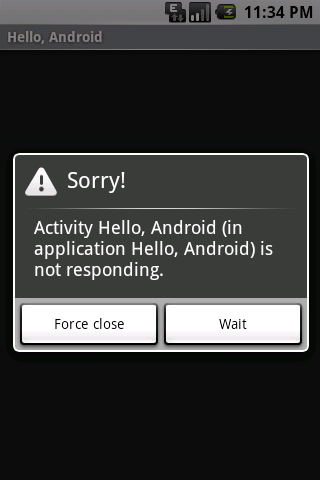
An ANR dialog displayed to the user.
An ANR dialog displayed to the user.
This document discusses how the Android system determines whether an application is not responding and provides guidelines for ensuring that your application is responsive.
이 문서는 안드로이드 시스템이 애플리케이션이 응답하고 있지 않는 지 여부를 결정하는 방법을 설명하고 여러분의 애플리케이션이 응답하는 것을 보증하기 위한 가이드라인을 제공한다.
This document covers these topics:
이 문서는 아래의 주제들을 다룬다.
In Android, application responsiveness is monitored by the Activity Manager and Window Manager system services. Android will display the ANR dialog for a particular application when it detects one of the following conditions:
안드로이드에서, 애플리케이션 응답성은 액티비티 매니저와 윈도우 매니저 시스템 서비스에 의해 감시된다. 안드로이드는 다음의 조건 중 하나를 감지할 때 특정한 애플리케이션에 대해 ANR 다이얼로그를 보여줄 것이다.
BroadcastReceiver hasn't finished executing within 10 secondsGiven the above definition for ANR, let's examine why this can occur in Android applications and how best to structure your application to avoid ANR.
ANR에 대한 위의 주어진 정의 하에서, 안드로이드 애플리케이션에서 왜 이것이 발생할 수 있는 지와 ANR을 피하기 위해서 여러분의 애플리케이션을 어떻게 최적으로 구조화할 지에 대해 알아보자.
Android applications normally run entirely on a single (i.e. main) thread. This means that anything your application is doing in the main thread that takes a long time to complete can trigger the ANR dialog because your application is not giving itself a chance to handle the input event or Intent broadcast.
안드로이드 애플리케이션은 하나의 쓰레드(예를 들어 메인(main))상에서 보통 전적으로 실행된다. 이것이 의미하는 바는 메인 쓰레드에서 여러분의 애플리케이션이 수행하는 어떤 것이 완료되는데 긴 시간을 가진다면 ANR을 유발할 수 있다는 것이다. 왜냐하면 여러분의 애플리케이션이 그 자신에게 입력 이벤트 또는 인텐트 브로드캐스트를 처리할 기회를 주지 않기 때문이다.
Therefore any method that runs in the main thread should do as little work
as possible. In particular, Activities should do as little as possible to set
up in key life-cycle methods such as onCreate() and
onResume(). Potentially long running operations such as network
or database operations, or computationally expensive calculations such as
resizing bitmaps should be done in a child thread (or in the case of databases
operations, via an asynchronous request). However, this does not mean that
your main thread should block while waiting for the child thread to
complete nor should you call Thread.wait() or
Thread.sleep(). Instead of blocking while waiting for a child
thread to complete, your main thread should provide a Handler for child threads to post back to upon completion.
Designing your application in this way will allow your main thread to remain
responsive to input and thus avoid ANR dialogs caused by the 5 second input
event timeout. These same practices should be followed for any other threads
that display UI, as they are also subject to the same timeouts.
그러므로 메인 쓰레드에서 실행되는 임의의 메쏘드는 가능한 한 최소한의 일을 해야 한다. 특히 액티비티들은 onCreate(), onResume()와 같은 핵심 생명주기 메쏘드에서 셋업하기 위해 가능한 한 적은 일을 수행해야 한다. 네트워크나 데이터베이스 오퍼레이션 같은 잠재적으로 길게 실행되는 오퍼레이션과 또는 비트맵 크기를 조정하는 것 같이 계산상 값비싼 연산은 자식 쓰레드에서 수행되어야 한다(또는 데이터 베이스 오퍼레이션 경우에는, 비동기적인 요청(asynchronous request)을 통해 수행되어야 한다). 하지만 이것은 여러분의 메인 쓰레드가 자식 쓰레드가 완료되도록 기다리는 동안 멈춰 있어야 하는 것을 의미하지 않는다 - 그리고 또한 Thread.wait() 또는 Thread.sleep()을 호출하지 말아야 한다. 자식 쓰레드가 완료되도록 기다리는 동안 멈추는 대신에, 여러분의 메인 쓰레드는 자식 쓰레드가 완료될 때 알려주기 위한 핸들러를 제공해야 한다. 이러한 방식으로 여러분의 애플리케이션을 디자인하는 것은 여러분의 메인 쓰레드가 입력에 대해 응답성을 유지하는 것을 가능하게 하고, 따라서 5초 입력 이벤트 타임아웃에 의해 발생되는 ANR 다이얼로그를 피할 수 있게 한다. 이와 같은 사례는 UI를 보여주는 임의의 다른 쓰레드들에서도 수반되어야 한다. 왜냐하면 그것들 또한 동일한 타임아웃에 영향을 받기 때문이다.
The specific constraint on IntentReceiver execution time emphasizes what
they were meant to do: small, discrete amounts of work in the background such
as saving a setting or registering a Notification. So as with other methods
called in the main thread, applications should avoid potentially long-running
operations or calculations in BroadcastReceivers. But instead of doing intensive
tasks via child threads (as the life of a BroadcastReceiver is short), your
application should start a Service if a
potentially long running action needs to be taken in response to an Intent
broadcast. As a side note, you should also avoid starting an Activity from an
Intent Receiver, as it will spawn a new screen that will steal focus from
whatever application the user is currently has running. If your application
has something to show the user in response to an Intent broadcast, it should
do so using the Notification
Manager.
IntentReciever 실행 시간에 대한 명확한 제약은 그것들이 하기로 되어 있었던 것이 무엇인지를 강조한다: 세팅을 저장하거나 노티피케이션을 등록하는 것과 같은 백그라운드에서의 작고 분리된 양의 작업. 그러므로 메인 쓰레드에서 호출된 다른 메쏘드들처럼, 애플리케이션들은 브로드캐스트 리시버에서 잠재적으로 긴 실행 오퍼레이션 또는 연산을 피해야 한다. 그러나 자식 쓰레드를 통해 집중적인 업무를 수행하는 것 대신에(브로드캐스트의 수명이 짧기 때문에), 만약 인텐트 브로드캐스트에 응답하여 잠재적으로 긴 시간동안 액션이 취해져야 한다면, 여러분의 애플리케이션은 하나의 서비스를 시작시켜야 한다. 주석으로, 여러분은 인텐트 리시버로부터 하나의 액티비티를 시작시키는 것을 또한 피해야 한다. 왜냐하면 그것은 사용자가 현재 실행하고 있는 애플리케이션이 무엇이든지 간에 그것으로부터 포커스를 빼앗을 새로운 스크린을 만들어내기 때문이다. 만약 여러분의 애플리케이션이 인텐트 브로드캐스트에 응답하여 사용자에게 보여주기 위한 어떤 것을 가지고 있다면, 그 애플리케이션은 노티피케이션 매니저를 사용해서 사용자에게 보여줘야 한다.
Generally, 100 to 200ms is the threshold beyond which users will perceive lag (or lack of "snappiness," if you will) in an application. As such, here are some additional tips beyond what you should do to avoid ANR that will help make your application seem responsive to users.
일반적으로 100ms에서 200ms가 사용자가 애플리케이션에서 지연을 느낄 수 있는 경계 지점threshold이다. 이와 같이, 여러분의 애플리케이션이 사용자에게 더 잘 응답하는 것처럼 보이도록 도와주는 ANR을 피하기 위해 여러분이 해야할 것 이외의 추가적인 팁들이 있다.
ProgressBar and ProgressDialog are useful for this).
